Trader en PowerShell sur Binance !
Hello les techies ! Dernier article de la série sur l’utilisation de l’API Binance en PowerShell Un petit récap de ce que l’on a fait : Partie 1 : Récupérer le prix d’une crypto...

Hello les techies !
Dernier article de la série sur l’utilisation de l’API Binance en PowerShell
Un petit récap de ce que l’on a fait :
Partie 1 : Récupérer le prix d’une crypto sur Binance en PowerShell
Partie 2 : Récupérer le solde d’un compte Binance en PowerShell
Et pour cette partie 3, c’est dans le titre ! on va trader 🙂 enfin on va passer des ordres d’achats et on va pouvoir choisir entre les 3 types d’ordres, Market, Limit et Stop Limit.
Comme Déjà dit dans les articles précédents, le code original n’est pas de moi, j’ai cependant fait quelques ajustements car celui-ci ne fonctionnait pas très bien.
En plus de ça, après ces 3 articles sur l’API de Binance en PowerShell, je m’attaque à la compilation de tout ça dans un module (avec quelques fonctionnalités en plus comme la prise en charge des ordres « test » pour ne pas faire de boulettes ^^)
Les fonctions
Si vous avez lus les articles précédents, vous allez voir que l’on reprend les mêmes fonctions de base comme l’authentification.
Ce qui va changer pour Trader en PowerShell c’est la fonction pour passer les ordres
On commence donc par créer un fichier New-Order.ps1 et on colle nos fonctions de base (je vous invite à consulter les articles précédent si vous souhaitez plus d’explications sur leurs rôles)
Il vous faudra bien entendu renseigner votre Clé API et votre Secret (pour récupérer ça sur votre compte Binance, j’en parle dans la Partie 2)
function Get-UnixTimeStamp { <# .SYNOPSIS Return the timestamp in millisecond of the Unix Epoch .DESCRIPTION Unix Epoch started the Thursday, January 1, 1970 12:00:00 AM. The function return the number of second from that time. .EXAMPLE Get-UnixTimeStamp #> param( ) $URL = "https://api.binance.com/api/v3/time" $TimeStamp = Invoke-RestMethod -Uri $URL -Method get return $TimeStamp.serverTime
} function Get-BinanceAPISignature { <# .SYNOPSIS Prepare the signature that will be sent with the API request .DESCRIPTION Endpoint requires sending a valid API-Key and signature .PARAMETER QueryString The queryString must contains the symobol, timestamp and a recvWindow .PARAMETER EndPoint The EndPoint you want to request .EXAMPLE $URI = Get-BinanceAPISignature -QueryString $QueryString -EndPoint "/api/v3/openOrders" #> param( [Parameter(Mandatory = $true)]$QueryString, [Parameter(Mandatory = $true)]$EndPoint ) $APISecret = "Votre API Secret" $hmacsha = New-Object System.Security.Cryptography.HMACSHA256 $hmacsha.key = [Text.Encoding]::ASCII.GetBytes($APISecret) $signature = $hmacsha.ComputeHash([Text.Encoding]::ASCII.GetBytes($QueryString)) $signature = [System.BitConverter]::ToString($signature).Replace('-', '').ToLower() $URI = "https://api.binance.com$($EndPoint)?$QueryString&signature=$signature" return $URI
} function Get-BinanceAPIHeader { <# .SYNOPSIS Prepare the header that will be sent with the API request .DESCRIPTION The header include your APIKey .PARAMETER #APIKey .EXAMPLE Get-BinanceAPIHeader #> param( ) $APIKey = "Votre Clé API" $Headers = New-Object "System.Collections.Generic.Dictionary[[String],[String]]" $Headers.Add("X-MBX-APIKEY", $APIKey) return $Headers
} function Request-API { <# .SYNOPSIS Run the CURL command with defined parameters .DESCRIPTION Call the API and error handling. Return the result of the request .PARAMETER Method Choose a method according to the EndPoint .PARAMETER URI This parameter needs to be obtained with Get-BinanceAPISignature .PARAMETER Headers This parameter needs to be obtained with Get-BinanceAPIHeaderx .EXAMPLE $ObjResults = Request-API -Method Get -URI $URI -Headers $Headers #> [cmdletbinding()] param( [Parameter(Mandatory = $true)][ValidateSet("POST", "GET", "DELETE")]$Method, [Parameter(Mandatory = $true)]$URI, [Parameter(Mandatory = $true)]$Headers ) try { $ArrayJsonResult = Invoke-RestMethod $URI -Method $Method -Headers $Headers #-Verbose } catch { $LastError = $Error[0].ErrorDetails.Message | ConvertFrom-Json <# write-host "1: " $ErrResp -b Red write-host "2: " $LastError.code -b Red write-host "3: " $LastError.msg -b Red #> switch ($LastError.code) { ("-1021") { write-host "TimeStamp Is outside of the recvWindow" } ("-1105") { write-host "TimeStamp issue" } ("-1003") { write-host "Too much request, IP Banned"; break } ("-2010") { write-host "Stop price would trigger immediately or Account has too many open stop loss and/or take profit orders on the symbol." } ("-1013") { write-host "The amount is not enough for this currency or not following the step size rule for the symbol." } ("-1111") { write-host "Too many decimal check the precision required with Get-ExchangeInfo" } } } return $ArrayJsonResult
}
Ensuite, et bien on va reprendre la fonction de la Partie 1, car pour les ordres Limit et Stop Limit il nous faut le prix actuel du token que l’on veut acheter ou vendre. plus précisément vous allez voir plus bas, c’est si on veut passer l’ordre en FIAT. c’est à dire en Euros ou en USDT par exemple.
C’est pour déterminer la quantité de token que l’on peut acheter avec nos FIAT.
function Get-Price { [cmdletbinding()] param( [Parameter(Mandatory = $false)] [string]$Symbol, [Parameter(Mandatory = $false)] [ValidateSet(0, 1, 2, 3, 4, 5, 6, 7, 8)] [string]$Decimal = 3 ) BEGIN { if ($PSBoundParameters.ContainsKey('Symbol')) { $URL = "https://api.binance.com/api/v3/ticker/price?symbol=" + $Symbol } else { $URL = "https://api.binance.com/api/v3/ticker/price" } } PROCESS { $Ticker = Invoke-RestMethod -Uri $URL -Method get } END { if ($PSBoundParameters.ContainsKey('Symbol')) { return [math]::Round($Ticker.Price, $Decimal) } else { return $Ticker } } }Et enfin nous avons la fonction principale pour créer nos requêtes d’ordres Market, Limit ou Stop Limit
Explication et tests plus bas
function New-Order { <# .SYNOPSIS Place an order to buy or sell crypto .PARAMETER Symbol The crypto you want to buy or sell .PARAMETER Side ValidateSet "BUY" or "SELL" .PARAMETER OrderType ValidateSet "OrderMarket" or "OrderLimit" or "OrderStopLimit" .PARAMETER Quantity Specifies the amount you want to spend (when buying) or receive (when selling) .PARAMETER FiatAmount specifies the amount you want to spend in USDT .EXAMPLE New-Order -Symbol BTCUSDT -Side BUY -OrderType OrderMarket -FiatAmount 20 -Verbose New-Order -Symbol ETHEUR -Side BUY -OrderType OrderMarket -FiatAmount 10 -Verbose .EXAMPLE New-Order -Symbol BTCUSDT -Side BUY -OrderType OrderLimit -FiatAmount 1000 -Price 33000 .EXAMPLE New-Order -Symbol BTCUSDT -Side BUY -OrderType OrderStopLimit -Quantity 0.002 -Price 33000 -StopPrice 36000 .EXAMPLE New-Order -Symbol XRPUSDT -Side SELL -OrderType OrderLimit -Quantity 100 -Price 0.5 New-Order -Symbol EGLDUSDT -Side SELL -OrderType OrderMarket -Quantity 0.07 -Verbose .EXAMPLE New-Order -Symbol XRPUSDT -Side SELL -OrderType OrderStopLimit -Quantity 100 -Price 0.55 -StopPrice 0.5 .NOTES Common error : The amount is not enough for this currency or not following the step size rule for the symbol. If you have set an small Ammount, Example: min quantity for EUR is 10 #> [cmdletbinding()] param( [Parameter(Mandatory = $true)] [string]$Symbol, [Parameter(Mandatory = $true)] [ValidateSet("BUY", "SELL")] [string]$Side, [Parameter(Mandatory = $true)] [ValidateSet("OrderMarket", "OrderLimit", "OrderStopLimit")] [string]$OrderType, [Parameter(Mandatory = $true, ParameterSetName = 'quantity')] [double]$Quantity, [Parameter(Mandatory = $true, ParameterSetName = 'quantity2')] [double]$FiatAmount ) DynamicParam { $paramDictionary = New-Object -Type System.Management.Automation.RuntimeDefinedParameterDictionary if ($OrderType -ne "OrderMarket") { # price param $attributes = New-Object -Type System.Management.Automation.ParameterAttribute $attributes.Mandatory = $true $attributeCollection = New-Object -Type System.Collections.ObjectModel.Collection[System.Attribute] $attributeCollection.Add($attributes) $dynParam1 = New-Object -Type System.Management.Automation.RuntimeDefinedParameter("Price", [double], $attributeCollection) $paramDictionary.Add("Price", $dynParam1) } if ($OrderType -eq "OrderStopLimit") { # StopPrice param $attributes2 = New-Object -Type System.Management.Automation.ParameterAttribute $attributes2.Mandatory = $true $attributeCollection2 = New-Object -Type System.Collections.ObjectModel.Collection[System.Attribute] $attributeCollection2.Add($attributes2) $dynParam2 = New-Object -Type System.Management.Automation.RuntimeDefinedParameter("StopPrice", [double], $attributeCollection2) $paramDictionary.Add("StopPrice", $dynParam2) } return $paramDictionary } BEGIN { # Check prerequisit try { Get-Command -Name Get-UnixTimeStamp -ErrorAction Stop | out-null Get-Command -name Get-BinanceAPISignature -ErrorAction Stop | Out-Null Get-Command -Name Get-BinanceAPIHeader -ErrorAction Stop | Out-Null Get-Command -Name Request-API -ErrorAction Stop | Out-Null } catch { Write-Host "Load Get-UnixTimeStamp, Get-BinanceAPISignature, Get-BinanceAPIHeader, Request-API first prior to laod the current script" -b red Break } $TimeStamp = Get-UnixTimeStamp # retrieve value from dyn param if ($OrderType -ne "OrderMarket") { $Price = $paramDictionary.values[0].value[0] $StopPrice = $paramDictionary.values[0].value[1] } switch ($OrderType) { "OrderMarket" { if ($PSBoundParameters.ContainsKey('FiatAmount')) { Write-Verbose "Order Market with FIAT" $QueryString = "symbol=$Symbol&side=$Side&type=MARKET"eOrderQty=$FiatAmount×tamp=$TimeStamp&recvWindow=5000" } else { Write-Verbose "Order Market with Quantity" $QueryString = "symbol=$Symbol&side=$Side&type=MARKET&quantity=$Quantity×tamp=$TimeStamp&recvWindow=5000" } } "OrderLimit" { if ($PSBoundParameters.ContainsKey('FiatAmount')) { $CurrentPrice = Get-Price -Symbol $Symbol -Decimal 8 $Quantity = [math]::Round($FiatAmount / $CurrentPrice, 6) } $QueryString = "symbol=$Symbol&side=$Side&type=LIMIT&price=$Price&timeInForce=GTC&quantity=$Quantity×tamp=$TimeStamp&recvWindow=5000" } "OrderStopLimit" { if ($PSBoundParameters.ContainsKey('FiatAmount')) { $CurrentPrice = Get-Price -Symbol $Symbol -Decimal 0 $Quantity = [math]::Round($FiatAmount / $CurrentPrice, 6) } $QueryString = "symbol=$Symbol&side=$Side&type=TAKE_PROFIT_LIMIT&stopPrice=$StopPrice&price=$Price&timeInForce=GTC&quantity=$Quantity×tamp=$TimeStamp&recvWindow=5000" } } } PROCESS { $URI = Get-BinanceAPISignature -QueryString $QueryString -EndPoint "/api/v3/order" $Headers = Get-BinanceAPIHeader $ObjResults = $null # need to do this? $ObjResults = Request-API -Method POST -URI $URI -Headers $Headers } END { return $ObjResults }
}Les tests
Je vous explique le fonctionnement avec des exemples concret.
Premier cas, je souhaite acheter de l’Ether avec des Euros, je regarde donc, comme pour get-price le symbol et dans mon cas c’est ETHEUR
Ensuite je souhaite acheter donc la side sera BUY et pour le OrderType on va faire un ordre direct pour commencer donc OrderMarket
Sur le dernier Paramètre on a le choix entre Quantity et FiatAmount. Soit je définie une quantité d’Ether, 1 par exemple et donc il me faudra 2577 euros disponibles dans le portefeuille sinon: erreur ^^.
Ou alors je définie une quantité d’Euros, comme 50 euros par exemple et là j’obtiendrais 0,01940059 Ether
Tout ça dépend évidement du prix du marché à l’instant où vous passez l’ordre !
Pour 10 euros la commande sera :
New-Order -Symbol ETHEUR -Side BUY -OrderType OrderMarket -FiatAmount 10 -Verbose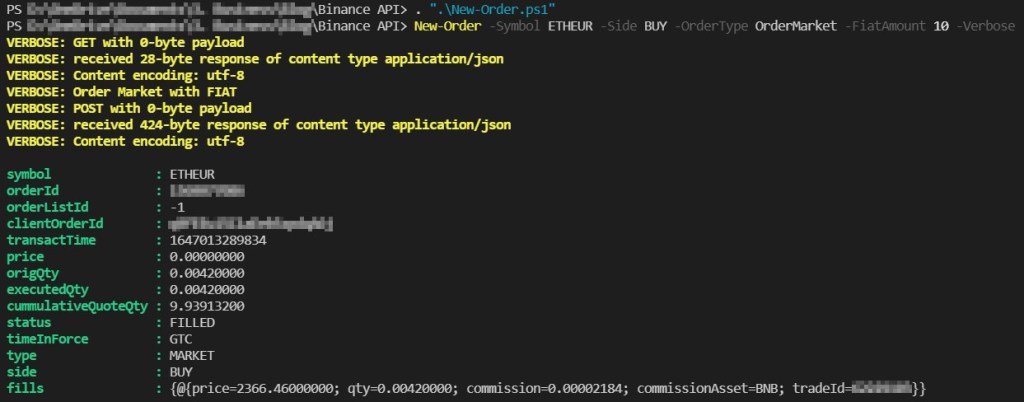
Je ne vais pas tester tout les cas dans cet article, ce que je peux vous dire c’est que ça fonctionne 😉
Juste un dernier, pour vendre des EGOLD vers de l’USDT en utilisant la quantité, la commande sera :
New-Order -Symbol EGLDUSDT -Side SELL -OrderType OrderMarket -Quantity 0.07 -Verbose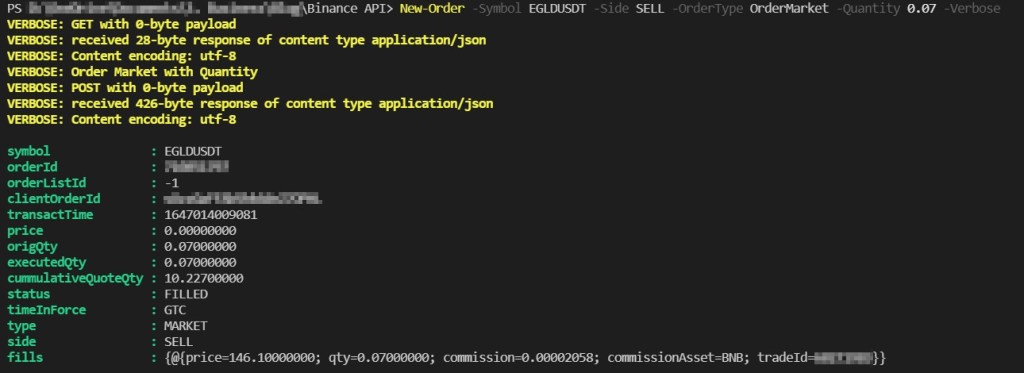
Gestion des erreurs
La gestion des erreurs se fait via la fontion Request-API, elle gère certains cas.
Par contre d’autres erreurs peuvent être retounées si la quantité minimum n’est pas bonne par exemple.
Dans mes tests j’ai eu cette erreur :
The amount is not enough for this currency or not following the step size rule for the symbol.
En fait c’est parce que le montant de l’ordre n’est pas assez important.
Pour un achat en EUR le minimum est de 10 euros, donc si on essaye de passer un ordre avec -FiatAmount 5, cela ne fonctionne pas et pareil pour vendre.
Conclusion
Dans cette série sur l’API de Binance en PowerShell nous avons vu comment récupérer le prix d’un actif, comment récupérer son portefeuille spot et comment passer des ordres spot, tout ça directement depuis le terminal !
Pour ma part je publie bientôt un module qui regroupe ces fonctionnalités plus quelques autres et j’en profite aussi pour gérer la config (Clé API, Secret…)
Cela permet ensuite de créer un bot par exemple, attention quand même car il y des des limites en nombre de requêtes et d’ordres. la doc ici :
https://binance-docs.github.io/apidocs/futures/en/#limits
A+ les techies !
Pour approfondir
Automatiser des ordres est un exercice de script ; comprendre ce qu'on achète en est un autre, et c'est le plus important des deux.

Bitcoin, Ethereum, blockchain : comprendre avant d'investir.
La référence en français pour scripter et administrer Windows en PowerShell.
Liens affiliés Amazon : hitea touche une commission sur les achats, sans surcoût pour vous.
Partager
Nos recommandations
Outils et services que nous utilisons et recommandons
Les liens ci-dessous sont des liens d'affiliation Amazon. En tant que Partenaire Amazon, nous réalisons un bénéfice sur les achats remplissant les conditions requises, sans surcoût pour vous.
Livres & formation
La référence en français pour scripter et administrer Windows en PowerShell.

Installer, configurer et administrer un serveur Windows pas à pas.
Sécurité & authentification

Stockage & sauvegarde

iodd ST400 Boîtier 2,5" Externe crypté - USB-C 3.1 Gen 1 | Odd/HDD virtuel amorçable (ISO, VHD, VMDK) | Chiffrement matériel AES256-XTS (76 Chiffres) | Bloqueur d'écriture matériel | Made in Korea
Disque dur externe USB 3.0 pour vos sauvegardes complètes.

